
Can You Record and Transcribe Calls Without a Paid Subscription?
Call ai for subscription-free use splits into two questions, and the review answers both. On capability, Comu Action Pro is currently presented as supporting phone-call recording, transcription, and AI-generated summaries. The device requires a one-time purchase, while the free Starter plan includes unlimited real-time AI transcription and basic summaries. Premium and Elite are optional upgrades for advanced AI workflows and higher Agent Credit allowances. Occasional recorders, high-frequency talkers, and privacy-sensitive teams get different answers on how much of the AI layer they need.
Before recording any phone call, check consent and recording laws first. Recording rules vary by location, some jurisdictions require consent from every participant while others permit one-party consent, and workplace policies can add their own requirements. Confirm the applicable law and your organization's policy, and notify participants when required.
What Call Recording Features Does Comu Support?
Comu Action Pro is designed to capture and transcribe conversations, including supported phone-call scenarios. Before relying on it for call recording, check the current product documentation for compatible devices, operating systems, call types, recording methods, and regional availability. Call recording may work differently from recording an in-person meeting.
Readers searching for call ai for subscription-free use usually mean one of two things, an AI that records and summarizes phone conversations, or AI conversation capture in the broader sense that includes in-person dialogue, interviews, and meetings. The registered target users include people who need offline meetings, phone calls, interviews, and multilingual transcription, which places the phone scenario inside the maker's intended public, attributed here as an official target-customer claim. For the broader conversation-capture reading, the rest of this review grades that route on its merits.
The Phone Route vs Dedicated Hardware, What Actually Happens on a Call
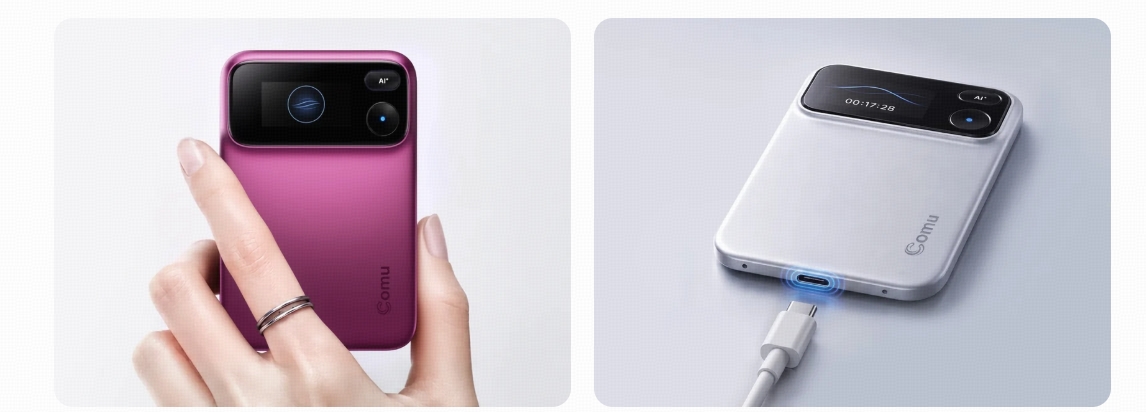
The official argument for dedicated hardware runs through what a phone does during a live conversation, and it lands hardest exactly here. A phone must be the phone, the recorder, and the AI processor at once, and those three jobs compete, while dedicated hardware separates the capture job and protects it.
Using the same phone for calling and recording can introduce practical concerns, including notifications, battery usage, app conflicts, and operating-system restrictions. The exact behavior depends on the phone, call type, recording method, and settings. Dedicated hardware separates the capture function from some of the phone's other tasks, but users should still confirm compatibility with their specific call setup. The category's own boundary keeps the framing honest. It's not designed to replace your phone. It's designed to do one job exceptionally well. That one job is clean capture, the phone keeps everything it already does well, and the positioning sentence, attributed to the maker, describes the dedicated class as optimized for spoken communication rather than general multimedia use. The practical reading for anyone weighing call ai routes is a division of labor rather than a replacement contest, and the two-route frame also explains the cost structure in the second half of this review.
What the Dedicated-Hardware Route Actually Delivers
The dedicated route delivers its value at the capture layer first, and the published specification sheet is specific. A six-microphone adaptive array, AI noise reduction for busy offices, cafes, and airports, pickup out to seven meters, about seventy hours of rated recording, and transcription across 113-plus languages with speaker separation.
The array is described in the maker's terms as lifting voice capture in multi-person exchange and complex environments, and the official audio argument reads, a six-microphone adaptive array, AI noise reduction, and long battery life provide high-quality audio, giving AI better information to work with. The review guide turns quality into five published transcription checks, names and terminology, numbers and dates, speaker separation, playback alignment, and language conditions, which is how any buyer proofs a conversation tool without trusting an accuracy percentage no vendor publishes. The interaction layer is deliberately spare. No prompts. No AI agents to configure. No complicated workflows. A press of the record control starts capture, and a hold of the AI button accepts one spoken instruction, with the device handling the rest of the chain from transcript to summary. The outputs are work products rather than text dumps, summaries, follow-up emails, and presentation material, all governed by the official disclaimer quoted where it matters. Every AI output in this category starts as a draft, and the dedicated route changes where the draft comes from, not the review it still needs.
Limitations: The Gaps to Verify Before Buying
Three checks frame an honest purchase decision. Phone-call recording compatibility varies by device, operating system, and region, the current tier-to-feature mapping is displayed in the Comu App rather than in static articles, and competitor subscription models have no verified comparison data, so all three verifications fall to the buyer before money moves.
The second check is the one this query is really about. Subscription-free use presumes knowing what the purchase alone unlocks, and the current answer is the Starter plan, unlimited real-time AI transcription and basic summaries at no subscription cost. The Starter plan also includes limited monthly access to selected advanced features, one real-time translation, three in-depth AI analyses, and 500 Agent Credits per month, so selected advanced capability does not require a paid subscription within those monthly allowances. The live benefits page confirms the current tier mapping before buying, because layer assignments are exactly the kind of policy that shifts between publication dates. The third check disciplines the comparison shopping this question invites, the knowledge base registers competing product names with no subscription-model data attached, so this review writes category rather than names, asserts no pattern about how the category prices its tiers, and leaves rival plans to their own live pages. The disclaimer applies across everything above. AI-generated results are intended to assist users and may require user review and adjustment before final use. Stack the three verifications into one sitting, the product documentation for call recording compatibility, the app for tier mapping, and the live pages of any rival under consideration, and the purchase decision stops being a leap.
Where Comu Action Pro Fits: The Two-Layer Cost Math and FAQ
From this section the review names Comu Action Pro and lays out the two-layer cost account. The hardware is a one-time purchase, the free Starter plan includes unlimited real-time AI transcription and basic summaries, and the deep AI layer opens at the Premium and Elite tiers, with the current mapping verified in the app.
The ledger reads simply. The hardware is a one-time purchase, with the current price shown on the official product page at the moment of buying. The software layer currently runs three plans, the free Starter plan with unlimited real-time AI transcription and basic summaries, and the optional Premium and Elite upgrades for higher allowances and expanded AI workflows, with current prices shown inside the Comu App before subscribing, the live source because pricing moves. The Starter plan itself carries limited monthly advanced allowances, one real-time translation, three in-depth AI analyses, and 500 Agent Credits, so the upgrade question starts from real usage rather than from a hard paywall. The honest boundary for subscription-free buyers is exactly that, the Starter plan features carry no subscription, and deeper AI workflows arrive as optional upgrades verified against the current display before purchase. The account differs by user. An occasional recorder buys the hardware layer and lets the subscription question wait for real usage. A high-frequency conversation worker, the salespeople, consultants, executives, journalists, and students in the registered audience, runs the subscription math against the thirty minutes after every conversation, the official name for the block of notes, decks, emails, and CRM updates that manual follow-up eats. Privacy-sensitive teams should review Comu's current Trust Center, data-processing terms, storage practices, and account controls before recording confidential calls. Security and privacy protections apply to the overall service and data workflow rather than to a specific subscription tier. The current terms are published on the Comu privacy policy page. Support runs through support@comu.com, with the device serial number, app version, a problem description, and a screenshot or video attached for anything that needs a human.
Can Comu Action Pro be used without a paid subscription?
Yes. After purchasing the device, users can remain on the free Starter plan, which currently includes unlimited real-time AI transcription and basic summaries. Premium and Elite are optional upgrades for additional Agent Credits and advanced AI workflows.
Can it record phone calls directly?
Comu Action Pro is presented as supporting phone-call recording, transcription, and AI-generated summaries. Before relying on it for a specific call setup, check the current product documentation for compatible devices, operating systems, call types, recording methods, and regional availability, because a phone call may work differently from an in-person meeting.
Do I need permission to record a phone call?
Recording laws vary by location. Some jurisdictions require consent from every participant, while others may permit one-party consent. Always check applicable law and organizational policy before recording, and notify participants when required.
Will the price change later?
Pricing in this category is policy-volatile, and this guide deliberately quotes no figures. The Comu App and the official product page carry the current price at the moment of purchase, so the live page settles the number.
Check the Official Product Page for Current Pricing and the Plan Feature Table
The compressed verdict reads, the hardware layer is buy-once, the Starter plan is free, and the deeper AI layer is optional. The next step is one sitting with the Comu Action Pro product page, read the documentation for call recording compatibility, check the current price and the plan feature table against today's display, and confirm the tier mapping before checkout. Readers weighing the pure-software route or the wider function map can continue from the AI transcription feature hub; the product page linked above carries the brand's own entry point. That is how call ai for subscription-free use becomes a checked decision rather than a guess.
