
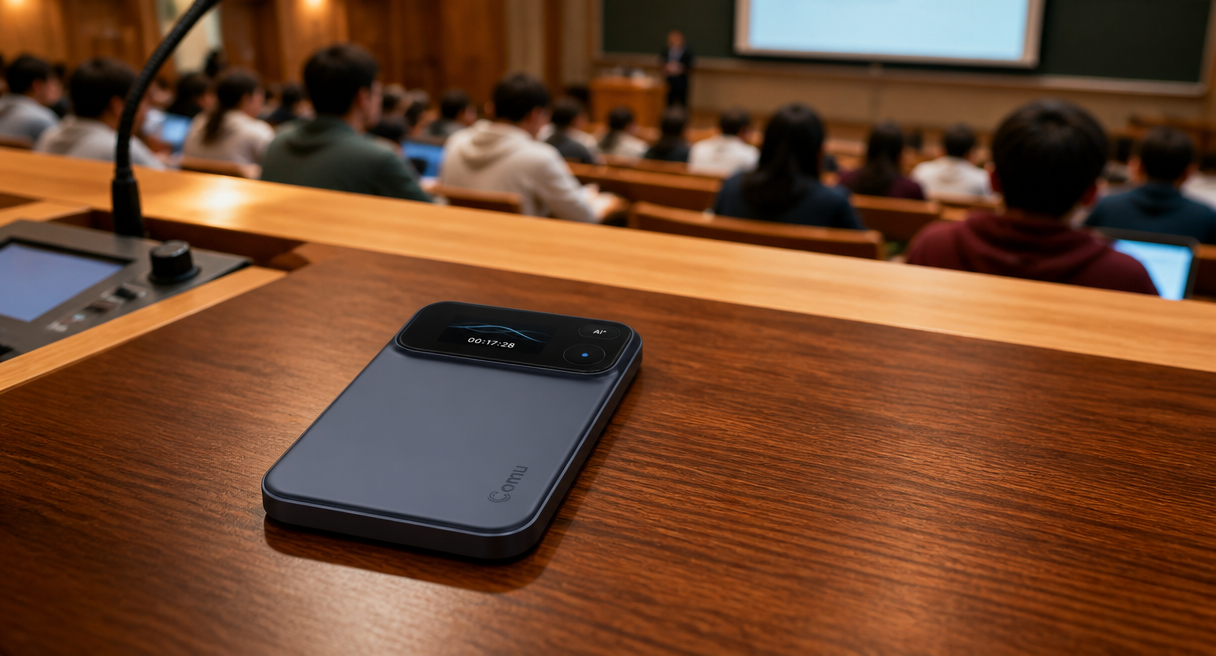
The best meeting recording app for lectures is decided by the physics of the hall itself, and by which side of the lectern the reader sits on. Listeners who need searchable notes for exam week carry one set of requirements, lecturers who need a dependable archive of their own sessions carry another, and both sets are scored against distance, duration, and noise before any feature list matters. A lecture recording app on a phone covers the front row well, while the back rows, the long day, and the noisy corridor point toward dedicated capture, and this guide sorts the two with one shared scorecard.
The Physics of a Lecture Hall: Distance, Duration, and Noise
Before recording a lecture, check the institution's recording policy and obtain the instructor's permission where required. Additional consent may be needed when students participate in discussions, presentations, or question-and-answer sessions. Do not publish or share lecture recordings or transcripts without authorization.
Three physical conditions set the bar for any lecture capture tool, because a lecture hall is not a meeting room. Seats sit far from the speaker, sessions stack into long days, and the room generates its own noise floor, so distance, duration, and noise are scored before any software feature.
Distance comes first. In a mid-size hall the distance from the lectern to the last row routinely passes five meters, and questions from the back row travel even farther, so pickup range is the first number to check in any recorder. The dedicated-hardware class publishes pickup out to seven meters, a vendor figure for favorable conditions rather than a guarantee, classroom sizes vary widely and seven meters does not promise the last row in every hall, and pickup range never equals clean transcription for every voice inside it, so placement near the speaker plus a real-room check still decide. Duration comes second. A university day stacks back-to-back sessions, and academic conferences run whole days, which is why the same class specifies up to 70 hours of recording on a single charge, sized for extended sessions, interviews, travel, and conferences. A phone drained by the second lecture has already decided the rest of the day. Noise comes third. Lecture halls bring flipping seats, corridor voices, and projector fans, and the category's published answer is AI noise reduction positioned for busy offices, cafes, and airports, with the stated purpose of reducing environmental noise so that the engine receives cleaner input. The category's registered target users include students and educators, which makes the lecture hall a designed-in scenario rather than an afterthought.
Why the Bottleneck Is Rarely the App: It Is Where the Phone Sits
The search asks for an app, but the quality bottleneck usually sits one layer below the software. A phone placed on a desk favors the nearest voice and drops the room, so the honest comparison scores capture hardware and software as one chain.
The maker-side argument for that chain reads as follows, quoted in full. Phone recordings can be interrupted by incoming calls and notifications, while built-in microphones often prioritize whichever voice is closest rather than capturing an entire discussion consistently. Dedicated hardware removes those distractions. In a lecture hall those three failures have exact seats, the call that lands mid-derivation, the microphone that favors the front row and fades the back, and the friend beside the phone who ends up louder than the professor. The counterweight belongs beside the argument, because dedicated hardware also asks a one-time purchase and one more device in the bag, and the category states its own boundary plainly. It's not designed to replace your phone. It's designed to do one job exceptionally well. For a lecture workflow that one job is exactly the capture step, while the phone keeps everything else it already does well.
After the Lecture: Students Need Searchable Notes, Not Audio Files
The real endpoint of lecture capture sits weeks after the recording, in exam-week retrieval, and a folder of audio files cannot answer it. Transcription with playback highlight, multilingual translation, structured summaries in named elements, and a searchable, tagged history are what turn one lecture into a findable asset instead of an unnamed file.
What exists the morning after decides the tool, which is why most searches for the best meeting recording app for lectures quietly end at this layer rather than at the recording itself. The category capability chain reads, in its published terms, real-time transcription that turns speech into text while the recording runs, with the text highlighting in step with playback, so a confusing derivation can be re-watched against its transcript. Translation follows a two-step flow, choose a language, then view the translated conversation, and the official review conditions include names, brands, and numbers surviving the translation, which matters when the professor names the researcher behind a theorem. Summaries arrive in five named elements, key points, notes, action items, decisions, and follow-ups, which map onto a lecture as what was covered and what is due. The retrieval layer is the piece worth sitting with, colored tags, smart classification, and a searchable conversation history, plus cross-device search by keyword, in-app viewing and editing, and web-side continuation. In exam week this collapses into one motion, type a term, jump back to the sentence and its audio position, something a semester folder of unnamed audio files cannot do. The acceptance path is one real lecture through three steps, transcribe, summarize, then try to retrieve two things from memory, before any purchase.
A Recorder That Fits in a Schoolbag: The Parameter Answer
From this section the guide names Comu Action Pro, because its published specifications answer the lecture-hall scorecard line by line. Seven meters of pickup, seventy recording hours, a six-microphone array with AI noise reduction, and 113-plus languages, carried in a pocketable form with an OLED display and USB-C charging.

The official audio argument is quoted in full. A six-microphone adaptive array, AI noise reduction, and long battery life provide high-quality audio, giving AI better information to work with. Against the hall's physics it reads directly, pickup out to seven meters reaches toward the last row from the lectern, the up-to-70-hours-per-charge budget absorbs the longest teaching day, and the array plus noise reduction address seats, corridors, and fans at once. On the language axis, Comu supports transcription across 113+ languages according to its official specifications, which serves international students and visiting lecturers in the same room. Students should verify names, numbers, formulas, citations, and technical terms against the original recording. The maker's positioning sentence fits the archive side of the guide, Comu Action Pro is always ready to record, designed specifically for face-to-face conversations, and optimized for spoken communication rather than general multimedia use. Its published use cases include turning a long interview into a content framework and key points, which is the same chain a student runs from lecture to paper material. Every AI deliverable carries the official disclaimer in full, Comu Action Pro uses AI technology to process conversations and generate summaries, emails, presentations, and other content. AI-generated results are intended to assist users and may require user review and adjustment before final use. The Comu Action Pro product page carries the full specification sheet.
Budget Reality and How to Choose: Review, Multilingual, Archive
The cost ledger is short and checkable, one one-time hardware purchase with the current price on the official product page, the free Starter plan with unlimited real-time AI transcription and basic summaries, and optional Premium and Elite subscriptions whose current prices sit on the live store and app pages. The choice then follows the listener's own exam calendar and language load.
The ledger prints in three layers and was verified same-day. The hardware is a one-time purchase, with the current price shown on the official product page. After purchase, the free Starter plan includes unlimited real-time AI transcription and basic summaries, and Premium and Elite are optional upgrades with higher Agent Credit allowances and expanded access to advanced AI features and workflows, obtained by downloading the Comu app and subscribing in it, where current prices display before checkout. Comu does not advertise a student price, so this guide prices the standard figures only. The dispatch follows the reader. Review-driven listeners gain most from the transcription, summary, and searchable-history chain, multilingual listeners weight the 113-plus language and translation axis highest, and lecturers archiving their own sessions weight pickup distance and battery first. The compressed verdict reads, phones record the front row, while halls, back rows, and exam-week retrieval belong to the dedicated chain. The next step is one recorded lecture scored on the three physical criteria, with the official product page and the full AI transcription and summarization feature guide carrying the deeper comparison.
Can I record every lecture?
Not automatically. Recording rules vary by institution, course, location, and accessibility arrangement. Check the course policy and ask the instructor before recording.
The best lecture recording setup question closes in the hall itself, and one scored lecture settles it with evidence rather than app-store ratings.
